maxkb 调用本地 minerU 实现敏感文件本地入库
背景
公司的机密文件需要进行PDF解析成可读性的markdown 格式并进行入库,用于后续搭建智能体做专用知识库。
本地部署 minerU
minerU 是目前开源的解析工具中比较出色的产品,用云端的模型测试过,效果符合预期结果,不论是数学的复杂公式还是复杂文本现在都能实现解析。
本地部署 minerU 是需要算力的,因为在起 minerU 是需要下载模型并在遇到图片时就会运行他们特定的模型。正常纯文本的解析时不会起模型;
docker部署 minerU,Dockerfile文件如下:
因为是国内的原因,我这里改了用魔塔的命令下载模型
# Use the official vllm image for gpu with Volta、Turing、Ampere、Ada Lovelace、Hopper、Blackwell architecture (7.0 <= Compute Capability <= 12.0)
# Compute Capability version query (https://developer.nvidia.com/cuda-gpus)
# support x86_64 architecture and ARM(AArch64) architecture
FROM vllm/vllm-openai:v0.11.2

# Install libgl for opencv support & Noto fonts for Chinese characters
RUN apt-get update && \
    apt-get install -y \
        fonts-noto-core \
        fonts-noto-cjk \
        fontconfig \
        libgl1 && \
    fc-cache -fv && \
    apt-get clean && \
    rm -rf /var/lib/apt/lists/*

# Install mineru latest
RUN python3 -m pip install -U 'mineru[core]>=3.0.0' --break-system-packages && \
    python3 -m pip cache purge

# Download models and update the configuration file
// [!code focus]
RUN /bin/bash -c "mineru-models-download -s modelscope -m all"

# Set the entry point to activate the virtual environment and run the command line tool
ENTRYPOINT ["/bin/bash", "-c", "export MINERU_MODEL_SOURCE=local && exec \"$@\"", "--"]
// [!code focus]
创建一个minerU的镜像,用这个镜像作为基础镜像
docker build -t mineru:latest -f Dockerfile .在下载一个compose.yaml文件
# 下载 compose.yaml 文件
wget https://gcore.jsdelivr.net/gh/opendatalab/MinerU@master/docker/compose.yaml
需要修改一下compose.yaml文件
services:
  mineru-openai-server:
    image: mineru:latest
    container_name: mineru-openai-server
    restart: always
    profiles: ["openai-server"]
    ports:
      - 30000:30000
    environment:
      MINERU_MODEL_SOURCE: local
    entrypoint: mineru-openai-server
    command:
      --host 0.0.0.0
      --port 30000
      # --gpu-memory-utilization 0.5  # If encountering VRAM shortage, reduce the KV cache size by this parameter; if VRAM issues persist, try lowering it further to `0.4` or below.
    ulimits:
      memlock: -1
      stack: 67108864
    ipc: host
    healthcheck:
      test: ["CMD-SHELL", "curl -f http://localhost:30000/health || exit 1"]
    deploy:
      resources:
        reservations:
          devices:
            - driver: nvidia
              device_ids: ["0"]  # Modify for multiple GPUs: ["0", "1"]
              capabilities: [gpu]

  mineru-api:
    image: mineru:latest
    container_name: mineru-api
    restart: always
    profiles: ["api"]
    ports:
      - 8000:8000
    environment:
      MINERU_MODEL_SOURCE: local
    entrypoint: mineru-api
    command:
      --host 0.0.0.0
      --port 8000
      # --tensor-parallel-size 2
      # --gpu-memory-utilization 0.7
      # parameters for vllm-engine
      # --gpu-memory-utilization 0.5  # If encountering VRAM shortage, reduce the KV cache size by this parameter; if VRAM issues persist, try lowering it further to `0.4` or below.
    ulimits:
      memlock: -1
      stack: 67108864
    ipc: host
    healthcheck:
      test: ["CMD-SHELL", "curl -f http://localhost:8000/health || exit 1"]
    deploy:
      resources:
        reservations:
          devices:
            - driver: nvidia
              device_ids: ["0"]  # Modify for multiple GPUs: ["0", "1"]
              capabilities: [gpu]

  mineru-router:
    image: mineru:latest
    container_name: mineru-router
    restart: always
    profiles: ["router"]
    ports:
      - 8002:8002
    environment:
      MINERU_MODEL_SOURCE: local
    entrypoint: mineru-router
    command:
      --host 0.0.0.0
      --port 8002
      --local-gpus auto
      # To aggregate existing mineru-api services instead of starting local workers:
      # --local-gpus none
      # --upstream-url http://mineru-api:8000
      # --upstream-url http://mineru-api-2:8000
      # parameters for vllm-engine
      # --gpu-memory-utilization 0.5  # If encountering VRAM shortage, reduce the KV cache size by this parameter; if VRAM issues persist, try lowering it further to `0.4` or below.
    ulimits:
      memlock: -1
      stack: 67108864
    ipc: host
    healthcheck:
      test: ["CMD-SHELL", "curl -f http://localhost:8002/health || exit 1"]
    deploy:
      resources:
        reservations:
          devices:
            - driver: nvidia
              device_ids: ["0"]  # Modify for multiple GPUs: ["0", "1"]
              capabilities: [gpu]

  mineru-gradio:
    image: mineru:latest
    container_name: mineru-gradio
    restart: always
    profiles: ["gradio"]
    ports:
      - 7860:7860
    environment:
      MINERU_MODEL_SOURCE: local
    entrypoint: mineru-gradio
    command:
      --server-name 0.0.0.0
      --server-port 7860
      --tensor-parallel-size 2
      --gpu-memory-utilization 0.7
      # --enable-api false  # If you want to disable the API, set this to false
      # --max-convert-pages 20  # If you want to limit the number of pages for conversion, set this to a specific number
      # parameters for vllm-engine
      # --gpu-memory-utilization 0.5  # If encountering VRAM shortage, reduce the KV cache size by this parameter; if VRAM issues persist, try lowering it further to `0.4` or below.
    ulimits:
      memlock: -1
      stack: 67108864
    ipc: host
    deploy:
      resources:
        reservations:
          devices:
            - driver: nvidia
              device_ids: ["0","1"]  # Modify for multiple GPUs: ["0", "1"]
              capabilities: [gpu]
通过命令启动
docker-compose -f compose.yaml -- profile api up -d服务起来后就可以通过代码去调用minerU解析了
import requests
import json
from tqdm import tqdm
from pathlib import Path
import time

# === 参数配置 ===
API_URL = "http://192.168.8.109:8000/file_parse"
INPUT_FOLDER = Path("/Users/fit2cloud/Desktop/MaxKB 文档/MinerU_Original")
OUTPUT_FOLDER = Path("/Users/fit2cloud/Desktop/MaxKB 文档/MinerU_parse")
OUTPUT_FOLDER.mkdir(parents=True, exist_ok=True)

# 统一使用字符串形式的参数,防止接口识别布尔值异常
CONFIG = {
    "backend": "hybrid-auto-engine",
    "lang_list": "ch",
    "formula_enable": "true",
    "table_enable": "true",
    "return_md": "true",
    "response_format_zip": "false"
}

def process_files():
    # 调整为支持 pdf 和 docx (根据代码二的需求)
    extensions = ("*.pdf", "*.docx", "*.doc")
    files_to_process = []
    for ext in extensions:
        files_to_process.extend(INPUT_FOLDER.glob(ext))

    if not files_to_process:
        print("文件夹内没有找到待处理的文件。")
        return

    session = requests.Session()

    for file_path in tqdm(files_to_process, desc="正在处理文件"):
        for attempt in range(2): # 尝试 2 次
            try:
                with open(file_path, "rb") as f:
                    # 构造上传数据
                    files = {'files': (file_path.name, f)}
                    data = {**CONFIG, "parse_method": "auto"}

                    response = session.post(API_URL, files=files, data=data, timeout=600)

                if response.status_code == 200:
                    result = response.json()
                    results_dict = result.get("results", {})

                    if not results_dict:
                        print(f"\n⚠️ {file_path.name}: 接口返回成功但结果集为空")
                        break

                    # --- 核心改进:直接取结果集里的第一个 md_content ---
                    # 不管 Key 是带表情还是不带后缀,直接拿第一个结果里的 md_content
                    first_res = next(iter(results_dict.values()))
                    md_raw = first_res.get("md_content", "")

                    if md_raw:
                        # 保存文件(保持原名但后缀改为 .md)
                        save_path = OUTPUT_FOLDER / f"{file_path.stem}.md"
                        # 直接写入,MinerU 返回的通常已经是处理好的 UTF-8
                        save_path.write_text(md_raw, encoding="utf-8")
                        break
                    else:
                        print(f"\n⚠️ {file_path.name}: 找到结果 Key 但 md_content 为空")
                else:
                    print(f"\n❌ {file_path.name} 失败 (HTTP {response.status_code})")

            except Exception as e:
                print(f"\n尝试失败: {str(e)}")
                time.sleep(1)
        else:
            print(f"最终失败: {file_path.name}")

if __name__ == "__main__":
process_files()示例代码是通过调用/file_parse 这个是同步解析
也可以进行异步解析/tasks
import time
import logging
import requests
from typing import Optional, Dict, Any

from scipy.stats import false_discovery_control

# 配置日志
logging.basicConfig(level=logging.INFO, format='%(asctime)s - %(levelname)s - %(message)s')
logger = logging.getLogger(__name__)


class MinerUApiClient:
    def __init__(self, base_url: str):
        self.base_url = base_url
        self.session = requests.Session()
        self.session.timeout = 10  # 设置全局超时

    def create_task(self, file_path: str, params: Dict[str, Any]) -> str:
        """上传文件并创建任务,返回 task_id"""
        url = f"{self.base_url}/tasks"

        try:
            with open(file_path, 'rb') as f:
                files = {'files': f}
                # 注意:data 里的布尔值在 requests 中会被转为字符串 'True'/'False'
                # 如果后端严格要求 JSON 类型,建议使用 json 参数或手动转换
                response = self.session.post(url, files=files, data=params)
                response.raise_for_status()
                task_id = response.json().get("task_id")
                if not task_id:
                    raise ValueError("响应中未包含 task_id")
                return task_id
        except Exception as e:
            logger.error(f"创建任务失败: {e}")
            raise

    def get_task_status(self, task_id: str) -> Dict[str, Any]:
        """获取任务当前状态"""
        url = f"{self.base_url}/tasks/{task_id}"
        response = self.session.get(url)
        response.raise_for_status()
        return response.json()

    def get_result(self, task_id: str) -> Optional[str]:
        """获取并解析最终结果"""
        url = f"{self.base_url}/tasks/{task_id}/result"
        response = self.session.get(url)
        response.raise_for_status()

        res_data = response.json()
        results = res_data.get('results', {})

        # 提取第一个文件的 markdown 内容
        for file_info in results.values():
            return file_info.get('md_content')
        return None

    def wait_for_completion(self, task_id: str, interval: int = 3) -> Optional[str]:
        """轮询任务直到完成"""
        logger.info(f"开始轮询任务: {task_id}")
        while True:
            try:
                res_data = self.get_task_status(task_id)
                status = res_data.get("status")

                if status == "completed":
                    logger.info("任务完成!正在获取结果...")
                    return self.get_result(task_id)
                elif status == "error":
                    logger.error(f"任务执行失败: {res_data.get('error')}")
                    return None

                # 打印排队或进行中信息
                queued = res_data.get("queued_ahead", 0)
                msg = f"当前状态: {status}" + (f",排队中: {queued}" if queued > 0 else "")
                logger.info(msg)

                time.sleep(interval)
            except Exception as e:
                logger.error(f"轮询过程中出错: {e}")
                break
        return None


# --- 使用示例 ---
if __name__ == "__main__":
    CONFIG = {
        "base_url": "http://192.168.8.109:8000",
        "file_path": "/Users/fit2cloud/Desktop/MaxKB 文档/CA959-CN-R06组装~包装)(自动拉)_1-2.pdf",
        "parse_params": {
            "lang_list": ["ch"],
            "backend": "hybrid-auto-engine",
            "parse_method": "auto",
            "formula_enable": True,
            "table_enable": True,
            "return_md": True,
            "response_format_zip": False
        }
    }

    client = MinerUApiClient(CONFIG["base_url"])

    try:
        tid = client.create_task(CONFIG["file_path"], CONFIG["parse_params"])
        result_md = client.wait_for_completion(tid)

        if result_md:
            print("\n--- 解析内容摘要 ---")
            print(result_md[:500] + "...")  # 只打印前500字
    except Exception as e:
        print(f"流程执行中断: {e}")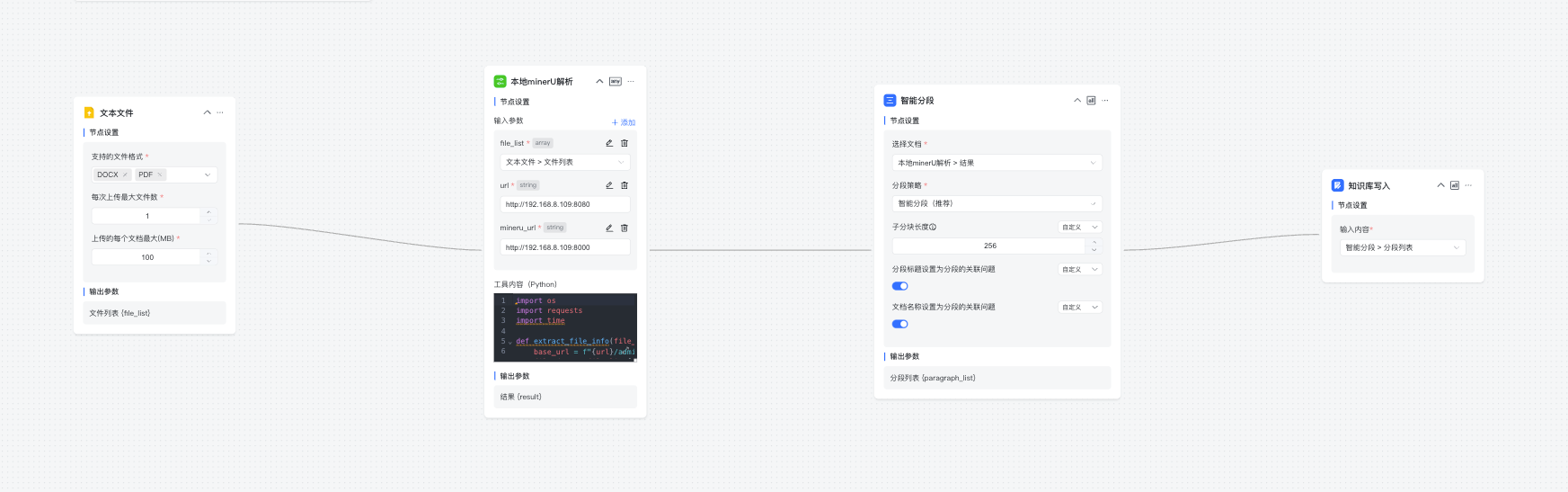
工作流的工具代码如下:
import os
import requests
import time

def extract_file_info(file_list, url):
    base_url = f"{url}/admin/oss/file/"
    file_data = file_list[0]
    file_id = file_data['file_id']
    file_name = file_data['name']
    download_url = f"{base_url}{file_id}"
    return download_url, file_name

def download_file_from_list(file_list: list, url: str, save_dir: str = "/tmp") -> str:
    try:
        download_url, file_name = extract_file_info(file_list, url)
        save_path = os.path.join(save_dir, file_name)

        if not os.path.exists(save_dir):
            os.makedirs(save_dir)

        response = requests.get(download_url, stream=True, timeout=30)
        response.raise_for_status()

        with open(save_path, 'wb') as f:
            for chunk in response.iter_content(chunk_size=8192):
                if chunk:
                    f.write(chunk)
        return save_path
    except Exception as e:
        raise Exception(f"下载文件失败: {e}")

def create_mineru_task(file_list: list, url: str, mineru_url: str) -> str:
    mineru_api = f"{mineru_url}/tasks"
    file_path = download_file_from_list(file_list, url)
    lock = True
    source_file_id = file_list[0].get("file_id")
    source_file_name = file_list[0].get("name")

    parse_params = {
        "lang_list": ["ch"],
        "backend": "hybrid-auto-engine",
        "parse_method": "auto",
        "formula_enable": True,
        "table_enable": True,
        "return_md": True,
        "response_format_zip": False
    }

    try:
        with open(file_path, 'rb') as f:
            files = {'files': f}
            response = requests.post(mineru_api, files=files, data=parse_params)
            response.raise_for_status()

            task_id = response.json().get("task_id")
            if not task_id:
                return "未能获取 task_id"

            while lock:
                try:
                    get_status_url = f"{mineru_url}/tasks/{task_id}"
                    status_response = requests.get(get_status_url)
                    status_data = status_response.json()
                    status = status_data.get('status')

                    if status == "completed":
                        lock = False
                        get_results_url = f"{mineru_url}/tasks/{task_id}/result"
                        res_response = requests.get(get_results_url)
                        res_data = res_response.json()

                        results = res_data.get('result', res_data.get('results', {}))

                        if not results:
                            return "解析完成,但未找到任何结果数据"

                        final_data = []
                        for file_info in results.values():
                            data_item = {
                                "id": source_file_id,
                                "name": source_file_name,
                                "content": file_info.get("md_content")
                            }
                            final_data.append(data_item)

                        return final_data

                    elif status == "error":
                        return f"解析出错: {status_data.get('error')}"

                    print("解析中,等待 3 秒...")
                    time.sleep(3)

                except Exception as polling_err:
                    print(f"轮询状态异常: {polling_err}")
                    break

    except Exception as e:
        return f"解析流程失败: {e}"